


Taobao Image Search has become a useful tool for businesses looking to source products from China more efficiently. Instead of searching with Chinese keywords, users can upload product images directly to find similar items, compare suppliers, and analyse pricing across Taobao.
1. How to Image Search on Taobao on Desktop?
Using taobao image search on desktop can significantly improve product discovery and supplier comparison. Instead of relying only on keywords, users can upload product images directly to find visually similar items, alternative suppliers, and competitive pricing across Taobao’s marketplace.
1.1. Open the Official Taobao Website
To begin the taobao search by image process, open a trusted browser such as Chrome or Microsoft Edge and access the official Taobao Website.
Using the official platform is important because third-party websites claiming to offer Taobao image search tools may expose businesses to phishing risks or inaccurate product data.
1.2. Log In to Your Taobao Account
Although some users attempt taobao image search without login, the platform often limits certain features for guest users. Logging into a verified account usually provides more stable access to image upload tools and product search functions.
1.3. Locate the Camera or Image Search Icon
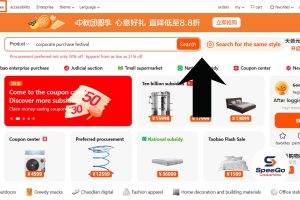
After reaching the homepage, locate the search bar near the top of the page. In many versions of Taobao, a small camera icon appears inside or beside the search field. This icon activates the taobao visual search function and allows users to upload product images directly from their computer.
1.4. Upload the Product Image
Click the camera icon and select an image file from your desktop device. Taobao’s system will analyse the uploaded image and generate visually similar product listings.
1.5. Review Search Results Carefully
After the upload process is complete, Taobao displays products that visually match or resemble the submitted image. Image search results may sometimes include visually similar but technically different products, especially in categories such as electronics or industrial equipment
1.6. Combine Image Search With Keyword Search
Although taobao image search helps users discover visually similar products quickly, combining image search with keyword research often produces more accurate sourcing results.
Learning how to search Taobao by image on desktop can help businesses improve sourcing speed, identify alternative suppliers, and compare product pricing more efficiently.
2. How to Image Search on Taobao on Mobile?
Compared with desktop browsing, the mobile app provides a faster and more convenient image recognition experience because the camera and photo gallery features are integrated directly into the Taobao application. This makes mobile image search especially useful for businesses sourcing fashion items, home décor, electronics, accessories, or trending consumer products.
2.1. Use the Official Taobao Mobile App
Before starting the taobao search by image process, businesses should download Taobao applications from trusted platforms such as the Apple App Store or Google Play Store.
2.2. Open the Search Function Inside the App
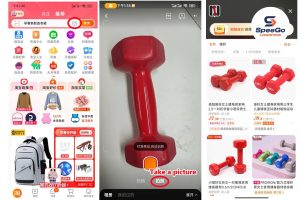
After launching the Taobao app, users will see a search bar near the top of the homepage. A camera-shaped icon is usually displayed inside or beside the search field.
2.3. Upload a Product Image or Take a Photo
Once the image search tool is activated, businesses can either upload an existing image or capture a new product photo using the phone camera. This method is especially useful when businesses do not know the Chinese product name or technical keywords.
3 Tips for Using Taobao Image Search More Effectively
Taobao image search can significantly reduce the time needed to find suppliers and compare products. However, many users still receive inaccurate results because they upload low-quality images or rely only on visual matching without checking supplier details carefully.
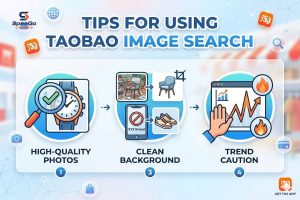
3.1. Use High-Quality Product Images
Clear and high-resolution product images usually generate more accurate search results. Taobao’s visual recognition system can identify shapes, colours, and design details more effectively.
Businesses should avoid blurry or heavily edited images because poor image quality may lead to unrelated product suggestions or inaccurate supplier matches.
3.2. Remove Unnecessary Background Elements
Images with complex backgrounds can reduce the accuracy of taobao search by image because the platform may mistakenly analyse surrounding objects instead of the actual product. Cropping unnecessary background details and focusing only on the main item can help businesses receive cleaner and more relevant product results.
3.3. Avoid Images With Large Watermarks or Text
Photos containing logos, promotional banners, or heavy text overlays may interfere with Taobao’s image recognition system and affect search relevance. Original product photos or catalogue images often produce more reliable search results than screenshots taken from social media platforms.
3.4. Be Careful With Trending Products
Taobao image search is commonly used to locate trending or viral products from social media platforms. High-demand products may experience inconsistent quality, price fluctuations, or stock shortages across different suppliers.
4. SpeeGo Logistics – Your Solution for Taobao Sourcing
Using taobao image search can help businesses find products faster and compare suppliers more efficiently on Taobao. However, managing supplier communication, shipping coordination, and customs procedures can still be difficult for international buyers.
SpeeGo Logistics helps businesses simplify the entire sourcing process from China. The company supports supplier communication, shipment consolidation, product inspection, and international delivery management. This allows businesses to use taobao image search more effectively while reducing sourcing risks and improving supply chain efficiency.