
Taobao provides access to a massive product ecosystem, but its Chinese-only interface can slow down the sourcing process for global businesses. This is where how to change language in Taobao becomes a practical concern rather than just a technical question.
1. Does Taobao Have an English version?
Currently, Taobao does not offer a fully localized English version of its platform. While some product titles or system messages may appear partially translated, there is no official setting that converts the entire interface into English. This limitation is confirmed by the structure of Taobao itself, which operates under Alibaba Group and focuses on local consumers rather than international buyers. As a result, users searching for “is taobao available in English” often rely on third-party solutions rather than native features.
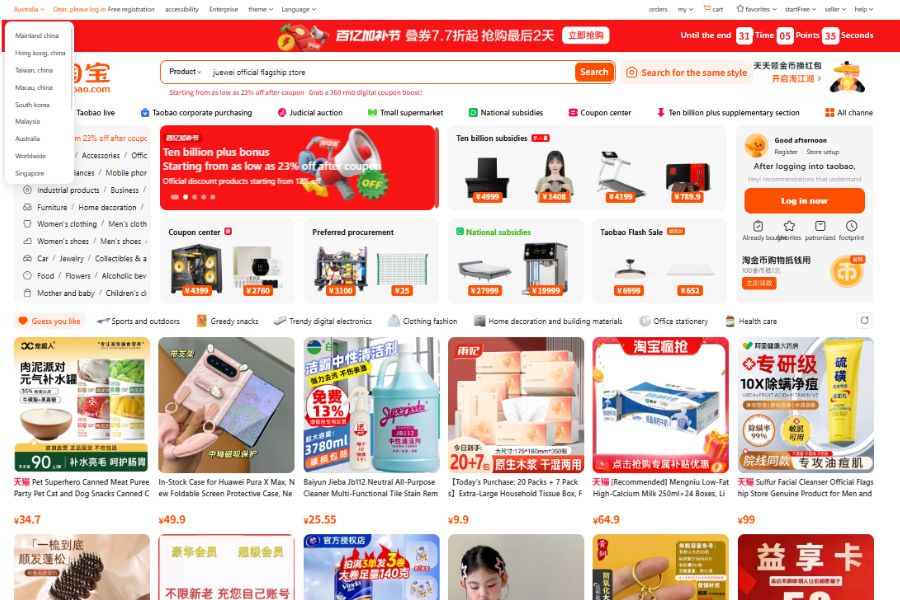
2. How to Translate Taobao Website to English?
If you want to research how to change language in Taobao, using a desktop browser remains the most efficient way to navigate the platform. Since Taobao does not provide a built-in English interface, translation tools become essential for understanding product details, supplier information, and order processes.
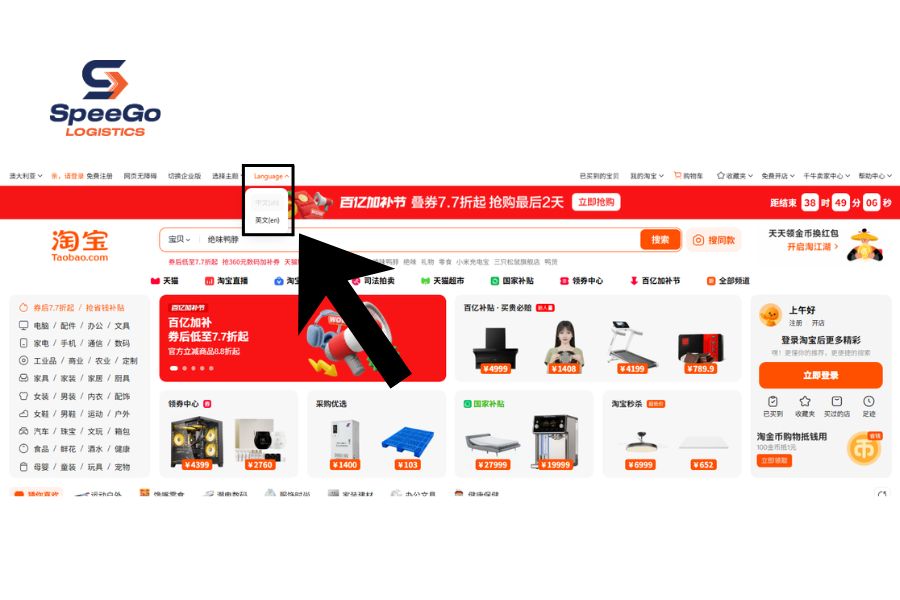
Here’s a step-by-step guide to switch your Taobao website to English:
- Access account settings from desktop
- Choose language settings
- Select english language
- Refresh and recheck language options
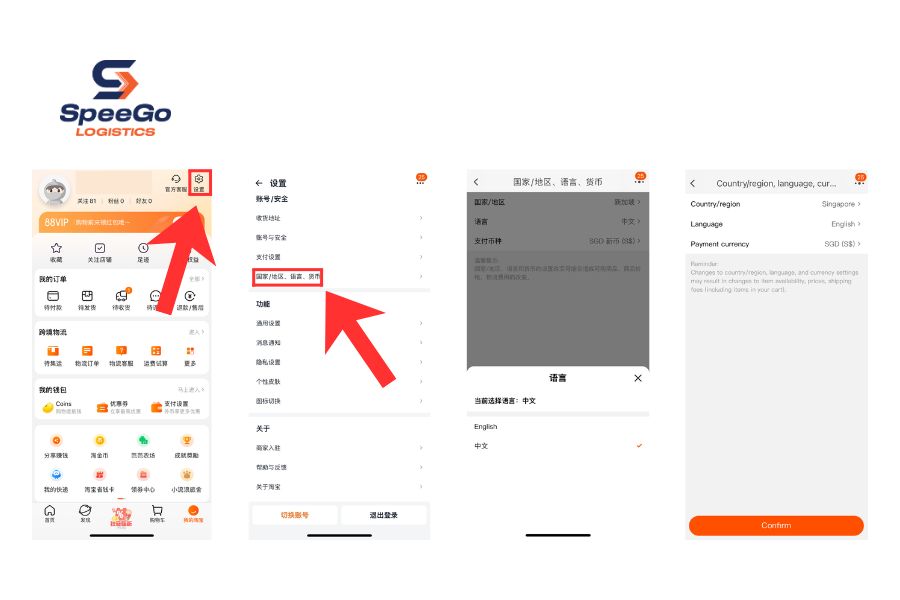
3. How to Change Taobao to English on App?
Changing the Taobao app to English is not fully supported through a direct language setting. However, users can enable partial English display by adjusting region and language preferences inside the app.
This method does not translate all content, but it can improve navigation for menus and system messages.
- Open settings in the Taobao app
- Select “Country & Region” (国家与地区).
- Choose your current country (e.g., UK, US, or Vietnam)
- Choose Confirm (确认)
- Refresh the App Interface
- Change Taobao App Language to English in (国家与地区/语言/货币)
- Select “Language” (语言)
Keep in mind that this method only enables partial translation. Most product listings and supplier content will remain in Chinese.
4. Best Tools to Change Taobao Language to English
When learning how to change language in Taobao, switching interface settings alone is not enough. Most product listings, specifications, and supplier messages remain in Chinese.
- Google Translate: This is one of the most practical tools for navigating Taobao. It supports both text and image translation, which is especially useful since many product details are embedded in images. Google Translate is suitable for quick checks and general understanding, particularly when reviewing multiple products.
- Browser Translation Tools: The simplest and quickest method to translate Taobao’s website is by using a web browser. Nonetheless, the quality of these translations is often not ideal, as browsers tend to translate text on a word-by-word basis, which can lead to inaccuracies.
- Translation App: Translation applications can be particularly useful, depending on the translation engine they utilize. Google Translate offers its own dedicated app, available on both the Google Play Store and the Apple App Store. Additionally, there are other reliable alternatives.
Changing the interface is only one small step. In reality, translation tools cannot fully resolve issues such as unclear product specifications, inconsistent quality, or miscommunication with suppliers on Taobao.
SpeeGo Logistics supports businesses in sourcing products directly from China, helping you evaluate suppliers, verify product details, and reduce risks before placing orders.
5. Tip for Finding Products on Taobao as an English Speaker
The bigger challenge lies in actually finding the right products on Taobao when most listings are written in Chinese. Without the right approach, search results can be inaccurate or incomplete, leading to missed opportunities.
5.1. Use Image Search
Searching for items using English keywords such as “computer” or “dress” is often ineffective, as Taobao’s search function does not handle English queries very efficiently.
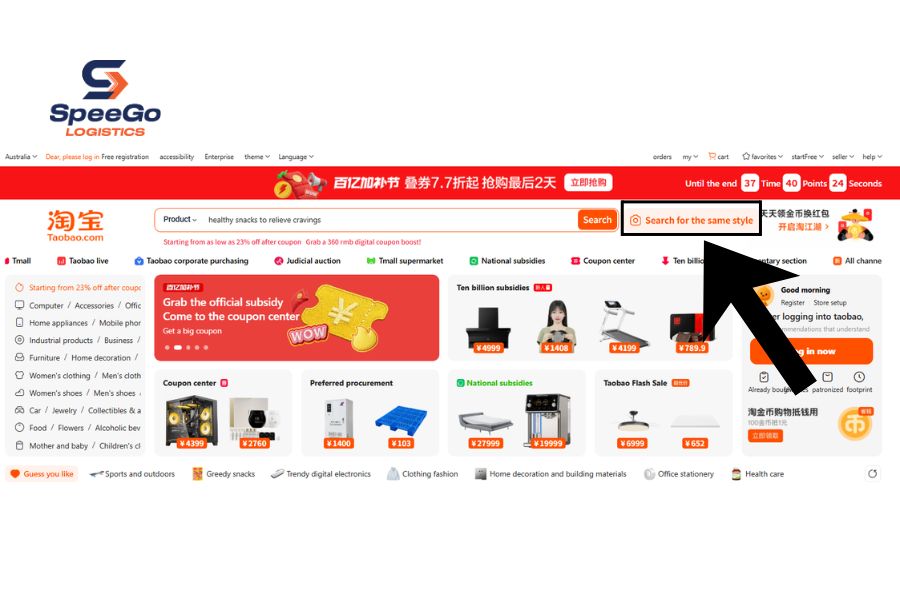
Here’s a step-by-step guide:
- Download a product image.
- Visit taobao.com and click on the camera icon located in the search bar.
- Upload the image you want to search for.
5.2. Learn Basic Product-Related Chinese Terms
You do not need to be fluent in Chinese, but understanding a few common terms can significantly improve your search efficiency. For example like 批 (wholesale), 工厂 (factory), 定制 (customization). These keywords help filter results toward suppliers that are more suitable for business sourcing.
5.3. Compare Multiple Suppliers Before Deciding
Relying on a single listing can be risky. Taobao offers a wide range of suppliers for similar products.
Here’s how to filter out the products:
- Sort the listings by monthly sales to see which products are popular, and verify if multiple sellers are offering the same item.
- Avoid selecting the cheapest option immediately. Instead, examine the product photos, specifications, and customer reviews in detail (using browser translation tools if necessary).
- Look for the term “同款” (same model) in reviews, as it can assist in identifying identical products sold by different sellers.
Working with Taobao requires more than simply switching the interface to English. Even after applying methods related to how to change language in Taobao, much of the platform’s content remains in Chinese, which means buyers still need to rely on translation tools and careful evaluation.